



Every construction project needs a schedule, but not everyone needs the same level of detail. Executives need a high-level view of project progress, while field teams need detailed plans for the work happening today. Construction schedule levels solve this by organizing schedules into different levels, giving each stakeholder the information they need.
This guide explains what construction schedule levels are, how Levels 1 through 5 work, when to use each one, how they compare with a work breakdown structure (WBS), common mistakes to avoid, and how construction scheduling software helps keep every level connected.
What Are Construction Schedule Levels?
Construction schedule levels are a hierarchy of schedules that show the same project at different levels of detail. A Level 1 schedule provides a high-level overview of major milestones, while a Level 5 schedule breaks work down into detailed daily or hourly tasks. The levels in between provide the right amount of detail for different stages of planning and execution.

Each schedule level is designed for a different audience. Executives need a broad view of project progress, while project managers, superintendents, and field crews need increasingly detailed schedules to plan and manage the work.
Schedule levels are typically built from the top down, starting with major milestones and then adding phases, activities, and daily tasks. During construction, they are updated from the bottom up as field progress feeds back into the overall project schedule.
The 5 Construction Schedule Levels and When to Use Each One
Each construction schedule level serves a different purpose. As you move from Level 1 to Level 5, the schedule becomes more detailed and focuses on shorter timeframes. Together, these levels help everyone from executives to field crews stay aligned throughout the project.

Level 1 Construction Schedule: Executive Project Milestones
A Level 1 schedule provides a high-level overview of the project. It is designed for executives, owners, investors, and other stakeholders who need to understand overall progress without seeing day-to-day activities.
It highlights only the most important milestones and major project phases. Level 1 schedules are commonly created during the planning stage to support budgeting, approvals, and project decisions, then updated throughout the project to communicate progress. A construction milestone schedule is the most common format at this level, giving stakeholders a clear view of the dates that matter most.
A typical Level 1 schedule might include:
- Project kickoff
- Design complete
- Permits approved
- Structure topped out
- Substantial completion
- Occupancy
Rather than showing individual tasks, a Level 1 schedule focuses on the major milestones that define the project's overall timeline.
Level 2 Construction Schedule: Master Project Schedule
A Level 2 schedule breaks each Level 1 milestone into major project phases or work packages. It gives project managers and stakeholders a clearer view of how the project is organized without showing every individual task. Teams often use it for phase planning, resource coordination, and reporting. This level is closely related to the construction master schedule, which brings together all major phases into a single coordinated plan.
A typical Level 2 schedule might include:
- Site preparation
- Foundation work
- Structural framing
- Building envelope
- MEP rough-in
- Interior finishes
- Commissioning and handover
At this level, teams can see how the major phases relate to one another and where work overlaps, but the schedule still stays at a high level.
Level 3 Construction Schedule: Detailed Control Schedule
A Level 3 schedule is the complete CPM (Critical Path Method) schedule used to manage the project from start to finish. It includes detailed activities, dependencies, durations, and the critical path, making it the primary schedule for project control.
A typical Level 3 schedule might include:
- Excavate foundation
- Install footings
- Pour concrete foundation
- Cure concrete
- Erect structural steel
- Install roof system
- Complete MEP rough-in
- Perform final inspections
Unlike Levels 1 and 2, a Level 3 schedule shows how individual activities connect and which tasks directly affect the project completion date. It is commonly used for progress tracking, schedule updates, and critical path analysis. When projects need to recover lost time, construction fast tracking is often applied at this level to overlap activities and shorten the overall duration.
Level 4 Construction Schedule: Short-Term Lookahead Schedule
A Level 4 schedule is a rolling short-term plan that typically covers the next two to six weeks of work. It breaks the master schedule into smaller work packages so superintendents, site supervisors, and subcontractors can coordinate upcoming activities and prepare crews, materials, and equipment.
A typical Level 4 schedule might include:
- Week 1: Site grading and utility installation
- Week 2: Foundation excavation and formwork
- Week 3: Concrete pour and curing
- Material delivery dates
- Equipment mobilization
- Crew assignments
Unlike a Level 3 schedule, a Level 4 schedule focuses only on the work happening in the near future. It is updated regularly to reflect site progress and changing conditions. A construction whiteboard is a practical tool for planning and reviewing these short-term schedules with the whole site team.
Level 5 Construction Schedule: Daily or Field Execution Schedule
A Level 5 schedule is the most detailed level and focuses on a single day or shift. It is used by field crews and foremen to coordinate complex or high-risk activities that require precise planning.
A typical Level 5 schedule might include:
- 7:00–8:00 AM: Crew safety briefing and equipment setup
- 8:00–10:00 AM: Reinforcement installation
- 10:00–12:00 PM: Concrete pour
- 1:00–2:00 PM: Concrete finishing
- 2:00–4:00 PM: Site cleanup and quality inspection
A Level 5 schedule is only created when a work package needs a more detailed execution plan. It helps crews coordinate tasks safely, avoid conflicts, and keep work moving efficiently throughout the day.
How to Choose the Right Level for Your Construction Project
Not every project needs all five schedule levels. Smaller projects often work well with Levels 2 through 4, while large or complex projects may use the full hierarchy to support different stakeholders throughout the project lifecycle.
Choose the schedule level based on who will use it and what decisions they need to make.
- Level 1 for executives, owners, and investors who need a high-level project overview.
- Level 2 for project managers planning major phases and coordinating resources.
- Level 3 for detailed project control, progress tracking, and critical path management.
- Level 4 for superintendents and subcontractors planning the next two to six weeks of work.
- Level 5 for field crews coordinating complex daily or shift-based activities.
A good approach is to start with the schedule level required by the owner or contract, then add more detail as planning moves into execution. This keeps the schedule easy to manage while giving each team the level of information they need.
How Construction Schedule Levels Work Together Throughout a Project
Construction schedule levels are not separate plans. They are connected views of the same project, with each level supporting a different stage of planning and execution.
From Planning to Field Execution
Schedule levels are typically built from the top down. Levels 1 and 2 define the overall project roadmap, while Level 3 becomes the detailed baseline for managing the project. As work begins, Levels 4 and 5 guide short-term planning and daily execution. Progress from the field then feeds back into the higher-level schedules, keeping the entire project up to date.
Keeping Teams Aligned
Each schedule level should connect to the next. Changes made in detailed field schedules should roll up into the master schedule and executive reports, giving every stakeholder an accurate view of project progress. A project dashboard makes this easier by pulling information from all schedule levels into a single view that the whole team can reference. Using consistent activity codes and a common work breakdown structure (WBS) also helps.
Updating Schedule Levels
Not every schedule needs to be updated at the same frequency. Field schedules are often reviewed daily or weekly, while master schedules are typically updated monthly. Executive-level schedules only need updates when major milestones or significant project changes occur. Keeping every level in sync helps teams make better decisions and avoid unexpected schedule risks.
Construction Schedule Levels vs Work Breakdown Structure (WBS)
Construction schedule levels and a work breakdown structure (WBS) are closely related, but they serve different purposes.
- A WBS defines what needs to be delivered by breaking the project into phases, deliverables, and work packages.
- Construction schedule levels define when that work will happen and how much detail each audience needs to see. In most projects, the WBS is created first, and the schedule is then built from it.
| Factor | Construction Schedule Levels | Work Breakdown Structure (WBS) |
|---|---|---|
| Answers | When the work happens and how much detail is shown | What work needs to be completed |
| Structure | Five schedule levels, from executive milestones to daily tasks | Hierarchy of deliverables and work packages |
| Created | After the WBS | Before the project schedule |
| Primary user | Scheduler or project planner | Project manager |
| Updated | Daily, weekly, or monthly depending on the schedule level | When project scope or deliverables change |

What Are the Common Mistakes When Using Construction Schedule Levels?
Construction schedule levels only work when they are kept accurate and connected. Here are some of the most common mistakes to avoid:
- Updating only the higher-level schedules: Keeping executive or master schedules up to date while neglecting field schedules creates gaps between the plan and actual progress.
- Using inconsistent activity or WBS coding: Without consistent coding, schedule levels cannot roll up correctly, making reporting and progress tracking much harder.
- Relying only on a Level 1 schedule: High-level milestones are useful for reporting, but they do not provide enough detail to manage day-to-day work or identify problems early.
- Not updating lookahead schedules regularly: Level 4 and Level 5 schedules should be reviewed frequently. Outdated lookaheads make it harder for crews to coordinate work effectively.
- Starting with an unclear project scope: If the project scope is not well defined, every schedule level built from it becomes less accurate, leading to planning and coordination issues later.
Best Practices for Managing Construction Schedule Levels
A schedule hierarchy only works when every level stays connected and actively maintained. These practices help teams keep schedules accurate and useful throughout the project.
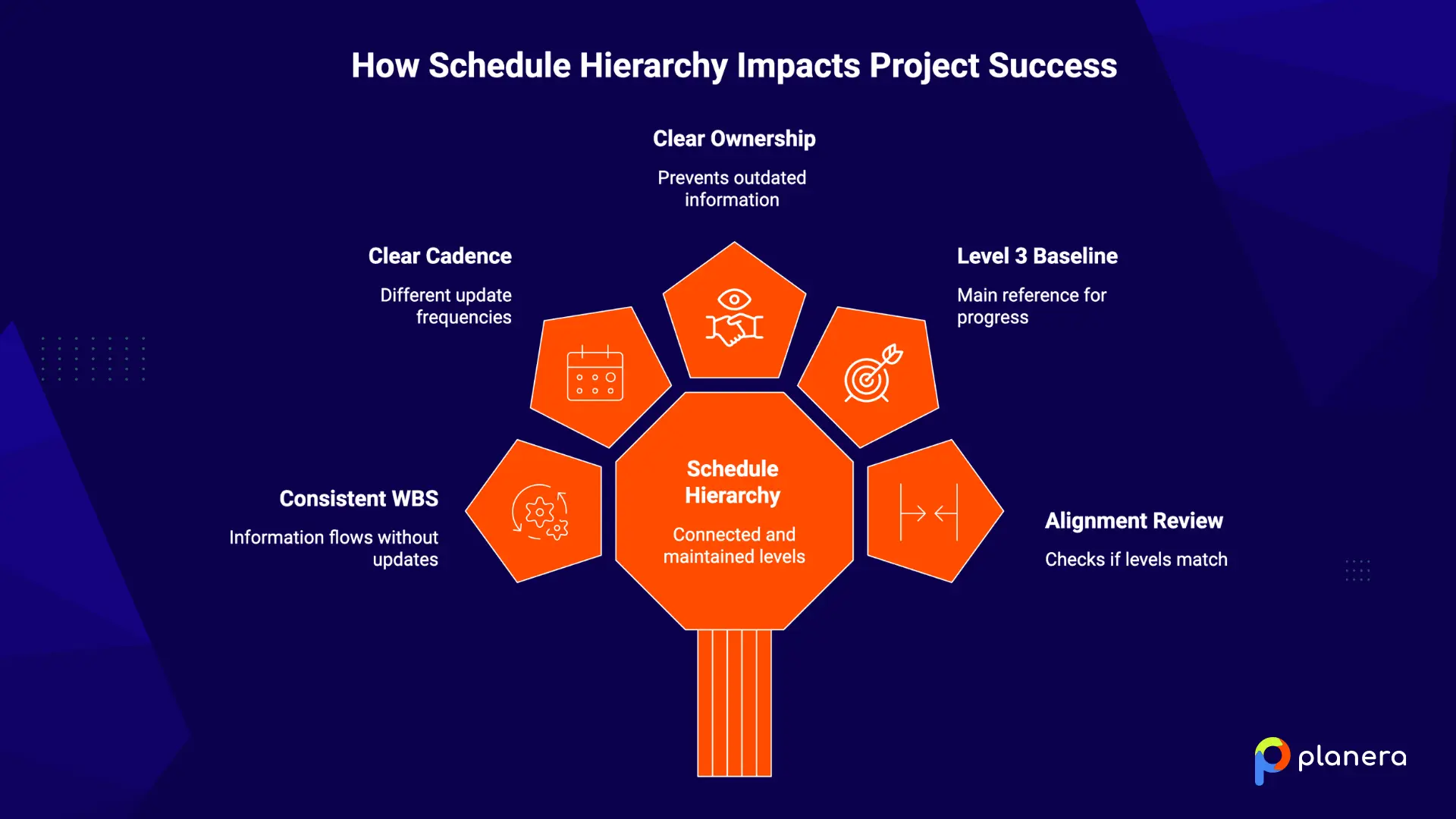
- Use consistent WBS and coding structures: Connect every schedule level through the same activity codes and work breakdown structure. This allows information to flow between levels without relying on manual updates.
- Set a clear update cadence for each level: Different schedule levels need different update frequencies. Levels 4 and 5 may require daily or weekly updates, while Level 3 is typically reviewed monthly and Levels 1 and 2 are updated around major milestones.
- Assign clear ownership: Define who is responsible for updating, reviewing, and approving each schedule level. Clear ownership prevents outdated information and missed updates.
- Use the Level 3 schedule as the baseline: The detailed CPM schedule should serve as the main reference point for measuring progress, tracking delays, and forecasting completion dates.
- Review alignment between schedule levels: Progress meetings should not only review individual schedules but also check that all levels still match. Misalignment between field and executive views is often an early sign of schedule risk. An AI scheduling assistant can help flag these misalignments automatically by comparing progress across levels in real time.
How Construction Scheduling Software Helps Manage Schedule Levels
Managing five schedule levels across separate spreadsheets, PDFs, and disconnected tools can quickly create gaps between the office and field. Modern construction scheduling software keeps Levels 1 through 5 connected, allowing updates from detailed field schedules to flow into higher-level views.
Visual scheduling tools make it easier to track dates, durations, dependencies, and potential delays across the project. Gantt charts, for example, help teams see how changes in one activity can affect downstream work and the overall completion date.
Planera helps teams manage multi-level construction schedules through a visual, collaborative interface. Instead of relying on one scheduler to maintain the plan, project teams can build, update, and review schedules together while keeping everyone aligned around the same source of truth.
With the right scheduling platform, schedule levels become more than separate reports. They become a connected system that helps teams plan better, respond faster, and keep projects on track.
FAQ
What are construction schedule levels?
They're a hierarchy of schedules, usually five, that show the same project at different depths of detail. Level 1 is an executive milestone summary and Level 5 is a daily field plan. Each level gives a specific audience the right amount of information.
What is a Level 1 construction schedule?
A one-page summary showing major milestones and key deliverables. Executives, sponsors, and external stakeholders use it for high-level reporting and go/no-go decisions.
What is the difference between a Level 2 and Level 3 schedule?
A Level 2 schedule shows major phases and work packages for planning and vendor comparison. A Level 3 schedule is the full CPM network that defines the critical path and usually becomes the project baseline.
What is a Level 4 lookahead schedule?
A rolling short-term schedule covering two to six weeks, broken into daily and weekly tasks. Superintendents and subs use it for weekly coordination on site.
What is a Level 5 construction schedule?
An optional, highly detailed plan for a single task or shift, with activities under 24 hours. Field crews use it for things like a concrete pour sequence or a crane pick plan.
Why do construction projects use multiple schedule levels?
Because one schedule can't serve everyone. Levels match detail to audience, so executives see milestones and crews see daily tasks without either group drowning in the wrong information.
Who creates each construction schedule level?
Clients or sponsors often start Level 1, contractors and PMs own Levels 2 and 3, and superintendents and foremen drive Levels 4 and 5 in the field.
How often should construction schedules be updated?
Update Levels 4 and 5 daily or weekly, Level 3 monthly, and Levels 1 and 2 at major milestones or change orders.
What software is used to manage construction schedule levels?
Common tools include Primavera P6 for CPM schedules, purpose-built platforms like Planera for connected multi-level views, and Excel for simple Level 1 summaries.
How do construction schedule levels improve project performance?
They connect executive milestones to daily field work, so delays surface early and everyone stays aligned. That visibility helps teams catch risk before it turns into a blown deadline or budget.

You deserve better scheduling software.
Drive revenue, reduce costs, and manage scheduling with Planera.
Request a Demo