



Keeping a construction project on schedule is easier said than done. With multiple teams, changing site conditions, and hundreds of moving parts, even a small delay can affect the entire timeline. That's why every successful project starts with a construction master schedule.
A construction master schedule brings together major activities, milestones, and deadlines into one plan, helping teams coordinate work, manage dependencies, and keep the project moving from start to finish. Many teams now use construction scheduling software to keep this plan easier to update, share, and adjust as project conditions change.
In this guide, we'll explain what a construction master schedule is, what it should include, how to create one step by step, and the best practices for managing it successfully.
What Is a Construction Master Schedule and Why Is It Important?
A construction master schedule is a high-level project timeline that maps out the major phases, milestones, activities, and dependencies from pre-construction through project closeout. It brings everything into one plan, so project teams can coordinate work, track progress, and stay aligned throughout the project.
A master schedule serves as the project's single source of truth. It helps teams understand what needs to happen, when it needs to happen, and how each activity affects the next. With a clear schedule in place, project managers can identify conflicts early, protect the critical path, coordinate labor and equipment, and keep owners and stakeholders informed.
A well-managed master schedule also reduces the risk of delays and cost overruns. When everyone works from the same timeline, decisions are made faster, dependencies are easier to manage, and the project is more likely to stay on track.
What Should Be Included in a Construction Master Schedule?
A construction master schedule should give a complete but easy-to-read view of the entire project. It focuses on the information teams actually need to plan, coordinate, and track work across all phases.
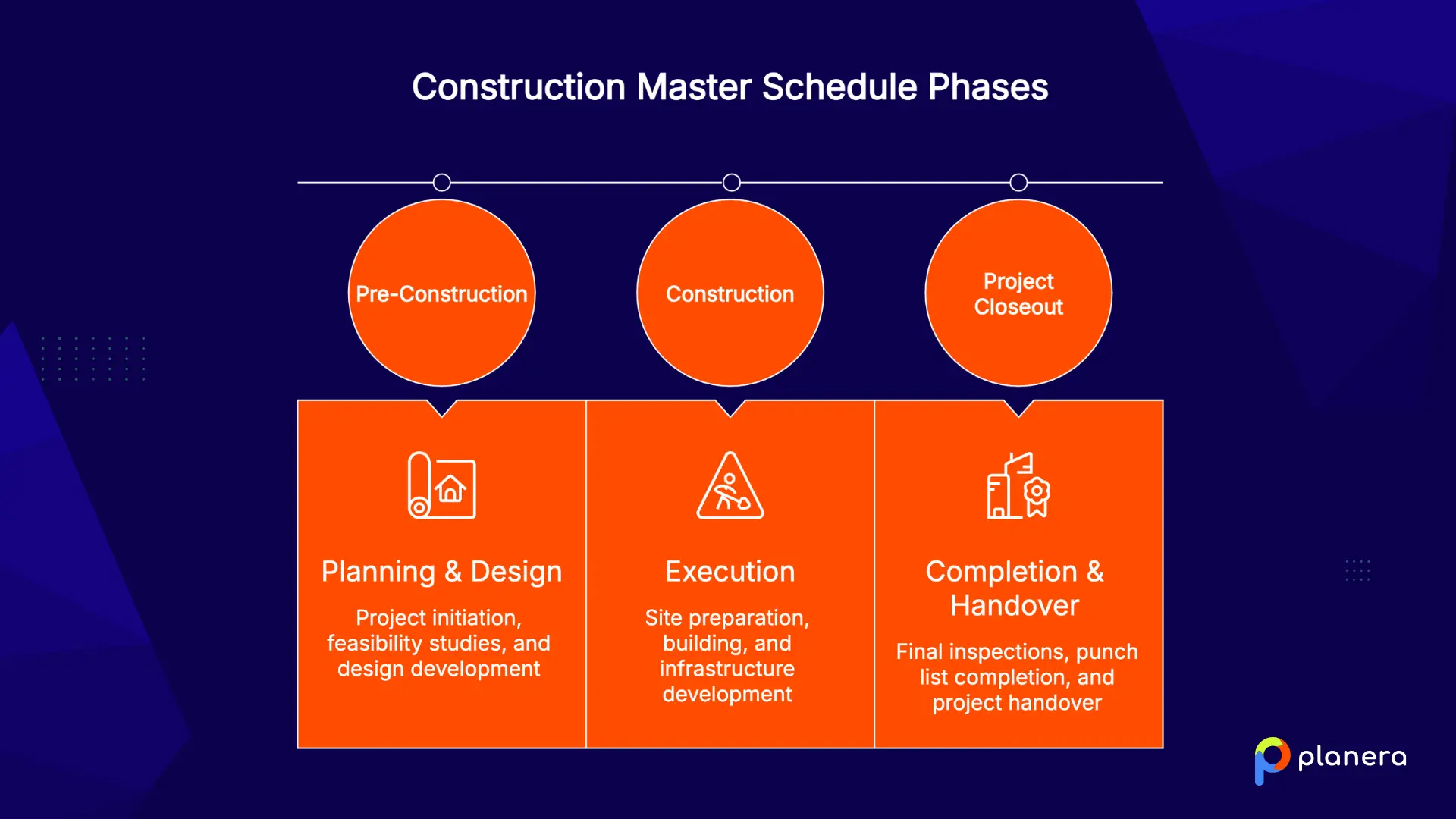
- Major project phases: The master schedule should outline the full project lifecycle, from pre-construction and design through permitting, procurement, construction, and final handover. This gives teams a clear structure of how the project will progress.
- Critical milestones and deliverables: Key checkpoints such as permit approvals, foundation completion, structural framing, inspections, and final handover should be clearly marked. These milestones make progress measurable and easy to track.
- Key dependencies and constraints: The schedule should show how tasks connect and what must be completed before others can start. It should also highlight constraints like approvals, access limits, or resource availability that may affect timing.
- Procurement and long-lead items: Materials and equipment with long delivery times should be included early in the schedule. Delays in items like steel, glazing, or MEP equipment can impact multiple phases.
- Project completion and handover dates: Final milestones such as substantial completion, punch list closeout, and owner handover should be clearly defined and tracked, since they often tie directly to contract obligations.
How to Create a Construction Master Schedule
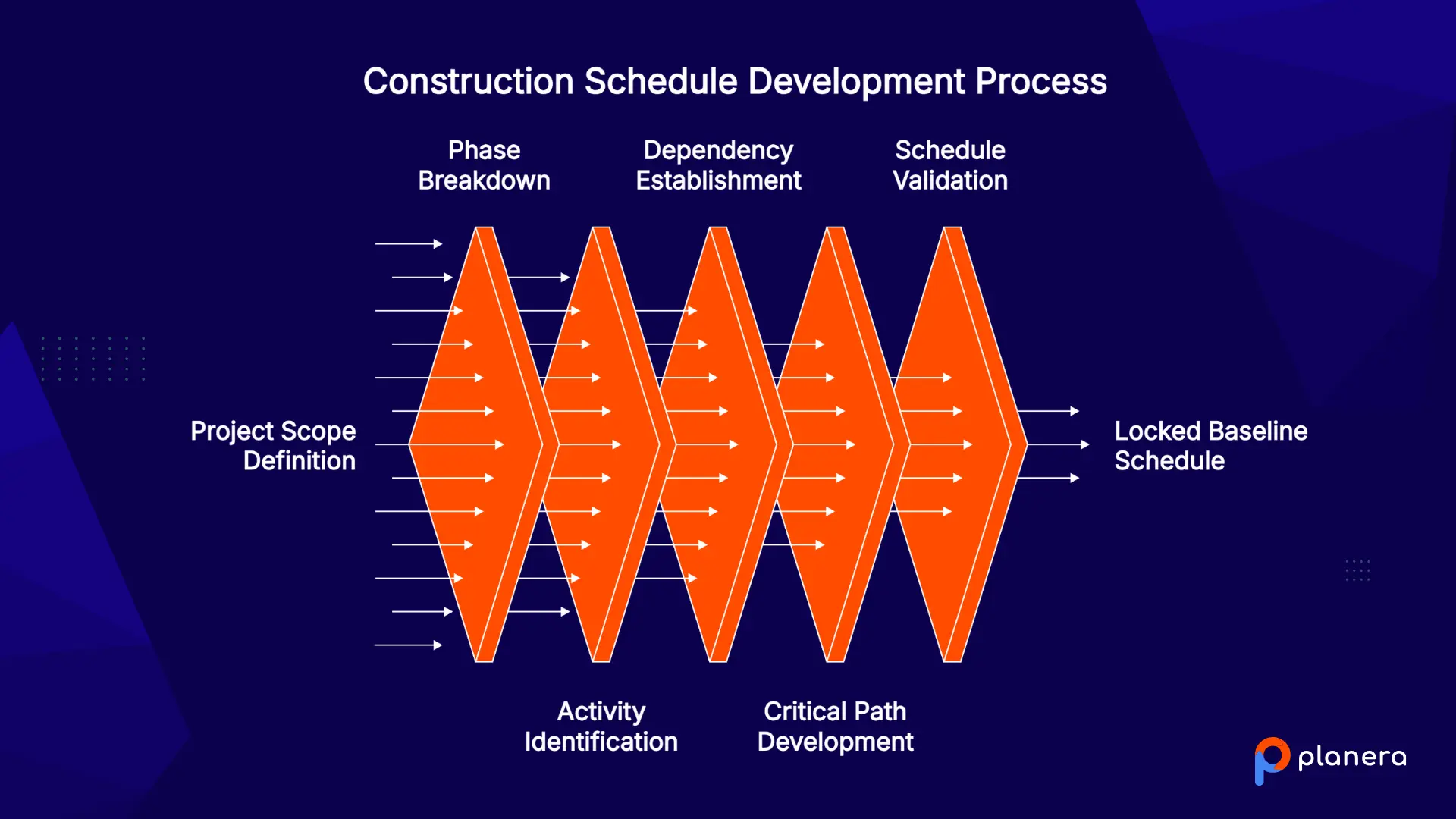
Building a construction master schedule follows a clear, structured process. The goal is to turn project scope into a realistic timeline that the entire team can follow.
Define Project Scope and Objectives
Start by aligning with the client, architect, engineers, and key trades on what needs to be built, along with the key goals, timelines, and deliverables. A clear and detailed scope sets the foundation for an accurate schedule and reduces confusion later in the project.
It also helps prevent scope gaps that can lead to delays or change orders once work begins. At this stage, it is important to capture both contractual requirements and real-world site constraints.
Break the Project Into Major Phases
Organize the work into high-level phases such as pre-construction, sitework, structure, MEP, finishes, and closeout. This structure helps simplify complex projects into manageable sections that teams can easily understand and follow.
Each phase should represent a logical stage of construction that builds on the previous one. Breaking the project this way also makes it easier to track progress and identify delays early.
Identify Key Activities and Milestones
Within each phase, list the major activities and milestone events such as permits, inspections, structural completion, and handover dates. These checkpoints can then be organized into a construction milestone schedule. These milestones act as checkpoints that show whether the project is progressing as planned.
They also help align different trades around shared goals and reduce miscommunication between teams. Clear milestones make it easier to report progress to stakeholders without diving into task-level detail.
Establish Dependencies Between Tasks
Define how activities relate to each other and which tasks must be completed before others can begin. Most relationships follow a finish-to-start logic, but some activities can overlap depending on construction sequencing and site conditions.
Getting dependencies right is critical because even small errors can cause major downstream delays. This step is what turns a simple task list into a realistic construction plan. Many teams run pull planning sessions with trade partners at this stage to validate sequencing before it gets locked into the master schedule.
Develop the Critical Path
Identify the longest chain of dependent tasks that determines the overall project duration. Any delay on this path directly affects the completion date, while non-critical tasks have flexibility or float. This step relies on CPM scheduling to calculate durations, dependencies, and float across the project. Understanding the critical path helps project managers focus attention on the activities that matter most. It also supports better decision-making when time or resources need to be adjusted.
Review and Validate the Schedule With Stakeholders
Walk the full schedule with your team and stakeholders. Confirm it reflects real-world conditions, then lock the baseline. Running a DCMA quality check on the schedule logic at this stage also helps catch open ends, broken links, and other issues before the baseline is set. A schedule nobody believes in is a schedule nobody will follow.
| Activity | Duration |
|---|---|
| Site Prep | 5 days |
| Foundation Excavation | 3 days |
| Foundation Pour | 2 days |
| Foundation Cure | 7 days |
| Framing | 14 days |
| Roof Dry-In | 5 days |
| Final Inspection | 1 day |
| Total Critical Path | 37 days |

Every other task either runs in parallel or carries float. The 37-day path sets your shortest possible schedule.
Construction Master Schedule vs Other Construction Schedules
People mix up schedule types all the time. Here's how the master schedule compares to the others you'll work with.
Master Schedule vs CPM Schedule
A master schedule and a CPM schedule are closely connected, but they do not serve the same purpose. The master schedule gives stakeholders the big-picture timeline, while CPM provides the logic that makes that timeline reliable.
| Factor | Master Schedule | CPM Schedule |
|---|---|---|
| Purpose | Provides a high-level view of the full project timeline. | Defines the logic used to calculate project duration and sequencing. |
| Role in planning | Shows the overall project plan for coordination and reporting. | Works behind the scenes to structure the schedule logically. |
| Level of detail | Broad, big-picture view without daily task detail. | More detailed, with dependencies, activity sequencing, and critical path logic. |
| Main focus | Overall phases, major activities, and project milestones. | Task relationships, float, dependencies, and the critical path. |
| Primary users | Owners, lenders, executives, and project stakeholders. | Schedulers, project managers, and planning teams. |
| Best used for | Owner reporting, lender communication, and overall project coordination. | Building a reliable schedule framework and identifying the critical path. |
| Relationship | The master schedule is the high-level result. | CPM is the method used to build and support the master schedule. |
Master Schedule vs Milestone Schedule
A master schedule and a milestone schedule are related, but the milestone schedule is much simpler. The master schedule shows the work needed to reach each key date, while the milestone schedule only highlights the major checkpoints.
| Factor | Master Schedule | Milestone Schedule |
|---|---|---|
| Purpose | Shows the full project timeline, including phases, activities, and sequencing. | Highlights only the most important project dates and checkpoints. |
| Level of detail | More detailed, with the structure behind each phase and milestone. | Simplified, with detailed activities removed. |
| Main focus | The full sequence of work required to manage the project. | Major approvals, phase completions, and contractual deadlines. |
| Primary users | Project managers, schedulers, owners, and coordination teams. | Owners, executives, clients, and external stakeholders. |
| Best used for | Managing the project and understanding how activities connect. | Reporting key dates and tracking high-level progress. |
| Relationship | The master schedule supports and explains the milestones. | The milestone schedule is usually pulled from the master schedule. |
| Simple way to understand it | The master schedule is what you manage. | The milestone schedule is what you report. |
Master Schedule vs Lookahead Schedule
A master schedule and a lookahead schedule work at different planning levels. The master schedule shows the full project timeline, while the lookahead schedule turns the near-term portion of that plan into actionable field work.
| Factor | Master Schedule | Lookahead Schedule |
|---|---|---|
| Purpose | Shows the full project timeline from start to finish. | Focuses on the work planned for the next few weeks. |
| Timeframe | Covers the entire project duration. | Usually covers the next two to six weeks. |
| Level of detail | High-level, with phases, major activities, and dependencies. | More detailed, with weekly or short-term tasks for field execution. |
| Main focus | Long-term planning, coordination, and overall project progress. | Near-term work planning, crew coordination, and task readiness. |
| Primary users | Owners, project managers, schedulers, and stakeholders. | Superintendents, field teams, trade partners, and project managers. |
| Best used for | Managing the overall project timeline and tracking major progress. | Turning the long-range plan into practical weekly or monthly work steps. |
| Relationship | The master schedule provides the long-term plan. | The lookahead schedule is pulled from the master schedule and updated based on field conditions. |
Common Challenges When Managing a Construction Master Schedule
Even a well-built master schedule runs into real-world challenges. These issues usually stem from changing on-site conditions and the complexity of coordinating multiple teams.
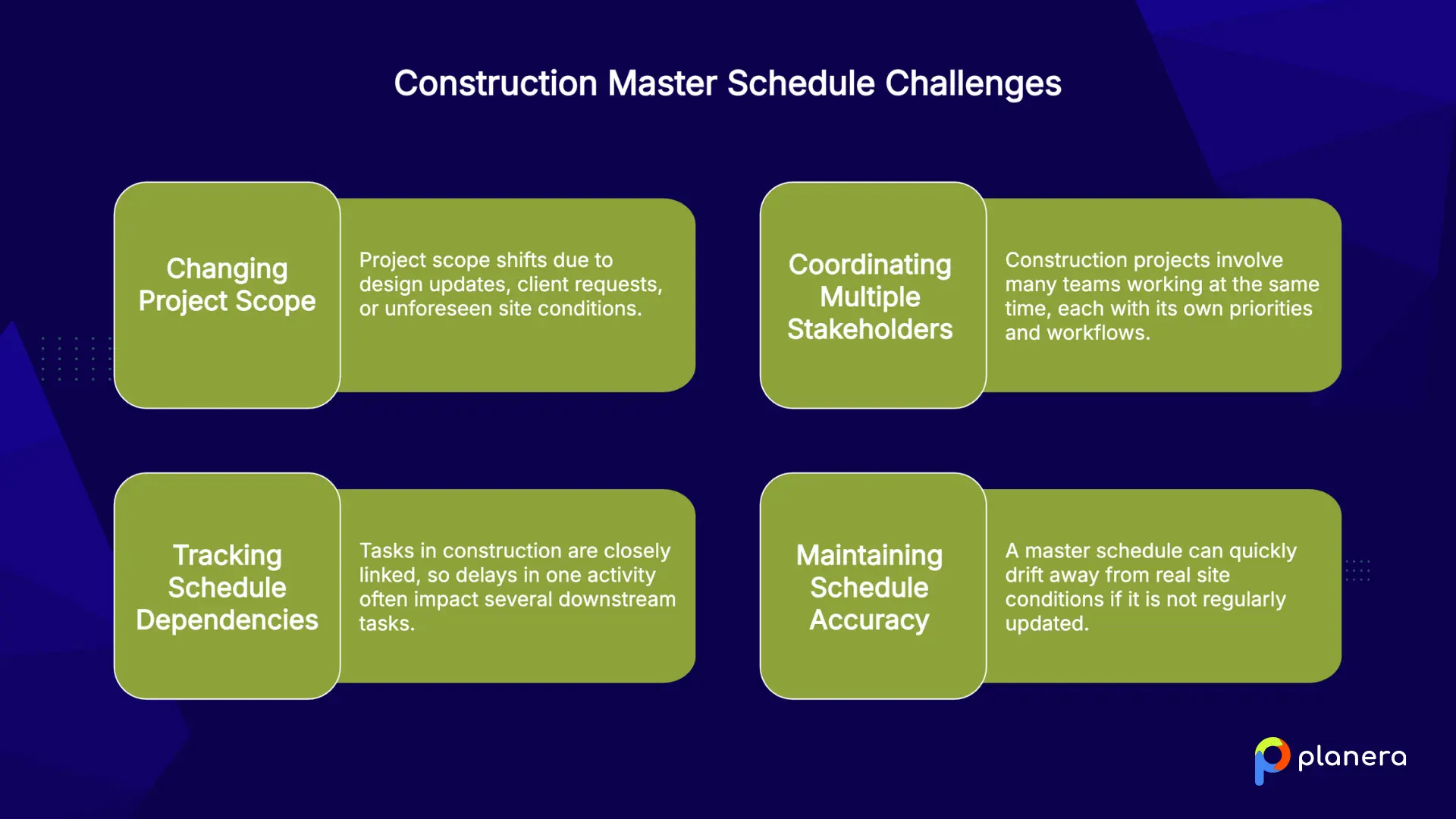
- Managing changing project scope: Project scope often shifts due to design updates, client requests, or unforeseen site conditions. Hence, slow design approvals and owner-driven changes are major causes of schedule disruption. When scope changes, the schedule must be updated quickly to stay realistic.
- Coordinating multiple stakeholders: Construction projects involve many teams working at the same time, each with its own priorities and workflows. Accordingly, managing these overlapping responsibilities and resource needs is a constant balancing act. Without clear coordination, delays in one area can easily affect others.
- Tracking schedule dependencies: Tasks in construction are closely linked, so delays in one activity often impact several downstream tasks. Keeping dependencies updated is essential to maintaining an accurate and reliable schedule. If relationships are not maintained correctly, the entire schedule logic can break down.
- Maintaining schedule accuracy: A master schedule can quickly drift away from real site conditions if it is not regularly updated.
Best Practices for Construction Master Scheduling
A few habits separate schedules that work from schedules that gather dust.
- Get stakeholder buy-in before baselining. We say that a schedule nobody believes in is a schedule nobody follows.
- Monitor the critical path closely. During active phases, check critical tasks daily. A slip there hits your completion date, so address problems fast with extra crews or overtime if needed. On schedules where teams are considering construction fast tracking to compress the timeline, the critical path needs to be reassessed since overlapping phases can shift which activities actually drive completion.
- Update on a regular cadence. Conditions change with weather, inspections, and scope, so keep the schedule current.
- Pair the master schedule with lookahead scheduling. The two layers work together. Review lookaheads weekly to remove finished work and add what's coming.
- Track actual vs. planned durations. We recommend applying those lessons so each project makes the next one more accurate.
What Common Mistakes to Avoid When Creating a Construction Master Schedule
The same mistakes show up project after project. Here's what to watch for.
- Ignoring contract scheduling requirements: Contract documents often define how schedules must be built and reported. As Planera notes, missing these requirements can lead to a schedule that does not meet approval or reporting standards.
- Letting the master and field schedules drift apart: When office and field schedules fall out of sync, the master schedule stops reflecting real progress. This reduces trust in the plan and weakens decision-making.
- Treating the schedule as a one-time document: A master schedule must be updated throughout the project. If it is left unchanged, it quickly becomes outdated and stops being useful.
- Choosing tools that are too complex for the field: If the scheduling tool is hard to use, field teams will not engage with it. Low adoption leads to poor data and unreliable schedules.
- Failing to update the critical path after changes: The critical path shifts as the project evolves. If it is not updated, teams risk focusing on the wrong activities and missing key deadlines.
How Construction Scheduling Software Improves Construction Master Schedules
Spreadsheets and whiteboards struggle to keep up with the speed of modern construction projects. Scheduling software helps teams maintain a more accurate master schedule by updating changes in real time and improving visibility across office and field teams.
Modern tools automatically recalculate dependencies and the critical path when changes occur. They also provide visual Gantt charts, collaborative views, and a project dashboard that make the schedule easier for everyone to understand at a glance. As SmartPM notes, mobile updates help field changes flow directly into the master schedule without delays.
Planera is a cloud-based CPM scheduling platform built for construction. It supports full dependency logic, floats, constraints, and critical path analysis but presents it in a visual, collaborative whiteboard where teams can build and update schedules together in real time.
We also let teams create field schedules directly from the master plan in seconds, helping connect long-term planning with short-term execution. Our AI scheduling assistant Manny helps surface risks and answer scheduling questions in plain language.
Planera also supports XER, XML, and MPP files and integrates with Procore and Autodesk Construction Cloud, keeping schedules connected across tools. Teams running a lean construction scheduling approach can use Planera to tie the master schedule directly to pull-planned commitments from the field.
FAQ
What is a construction master schedule?
A construction master schedule is a high-level timeline that maps out all major phases, milestones, deliverables, and dependencies across the project lifecycle. It acts as the central planning document that keeps teams aligned and protects the critical path from start to finish.
What should be included in a construction master schedule?
It should include major project phases, key milestones, task dependencies, procurement and long-lead items, and completion and handover dates. It should also clearly show the critical path and float so teams understand what drives the project timeline.
How do you create a construction master schedule?
Start by defining the project scope with all stakeholders, then break the work into phases. Next, identify key activities and milestones, set dependencies between tasks, and develop the critical path using CPM. Finally, review and validate the schedule before baselining it.
What is the difference between a master schedule and a CPM schedule?
CPM is the method used to calculate task durations, dependencies, float, and the critical path. The master schedule is the high-level output used for coordination, reporting, and tracking overall project progress.
Who is responsible for maintaining a construction master schedule?
A project manager or scheduler typically owns the master schedule, but it works best when updated with input from the field. Collaboration between office and site teams helps keep the schedule accurate and realistic.
How often should a master schedule be updated?
The master schedule is usually updated monthly, while short-term lookahead schedules are reviewed weekly. Regular updates ensure the schedule reflects real site conditions and keeps the critical path accurate.
What software is used for construction master scheduling?
Common tools include Primavera P6, Microsoft Project, and modern platforms like Planera. Planera combines full CPM capability with a visual, collaborative interface and supports integration with tools like Procore and Autodesk Construction Cloud.
Why is a construction master schedule important?
It keeps teams aligned, improves visibility, and helps protect the project timeline. A strong master schedule reduces delays, supports better coordination, and ensures everyone is working from the same plan.
What are common challenges in master scheduling?
Common challenges include scope changes, coordination across multiple stakeholders, dependency tracking, and keeping the schedule updated as field conditions change. Pairing the master schedule with lookahead planning helps reduce these issues.
How does a master schedule support project success?
It gives teams a shared roadmap, helps identify delays early, and keeps the critical path visible. When office and field teams work from the same schedule, projects are more predictable and easier to control.

You deserve better scheduling software.
Drive revenue, reduce costs, and manage scheduling with Planera.
Request a Demo