


Did you know that 98% of megaprojects face delays or budget overruns? Large construction projects finish an average of 20% behind schedule. One of the biggest reasons for this is poor construction sequencing.
When work happens in the wrong order, crews end up waiting, trades overlap, and small delays turn into major schedule problems. A clear construction sequence plan helps teams coordinate work, reduce downtime, and keep projects moving efficiently.
In this guide, we'll explain what construction sequencing is, how to create a construction sequence plan, the tools teams use to manage sequencing, and the common mistakes that lead to delays.
What Is Construction Sequencing?
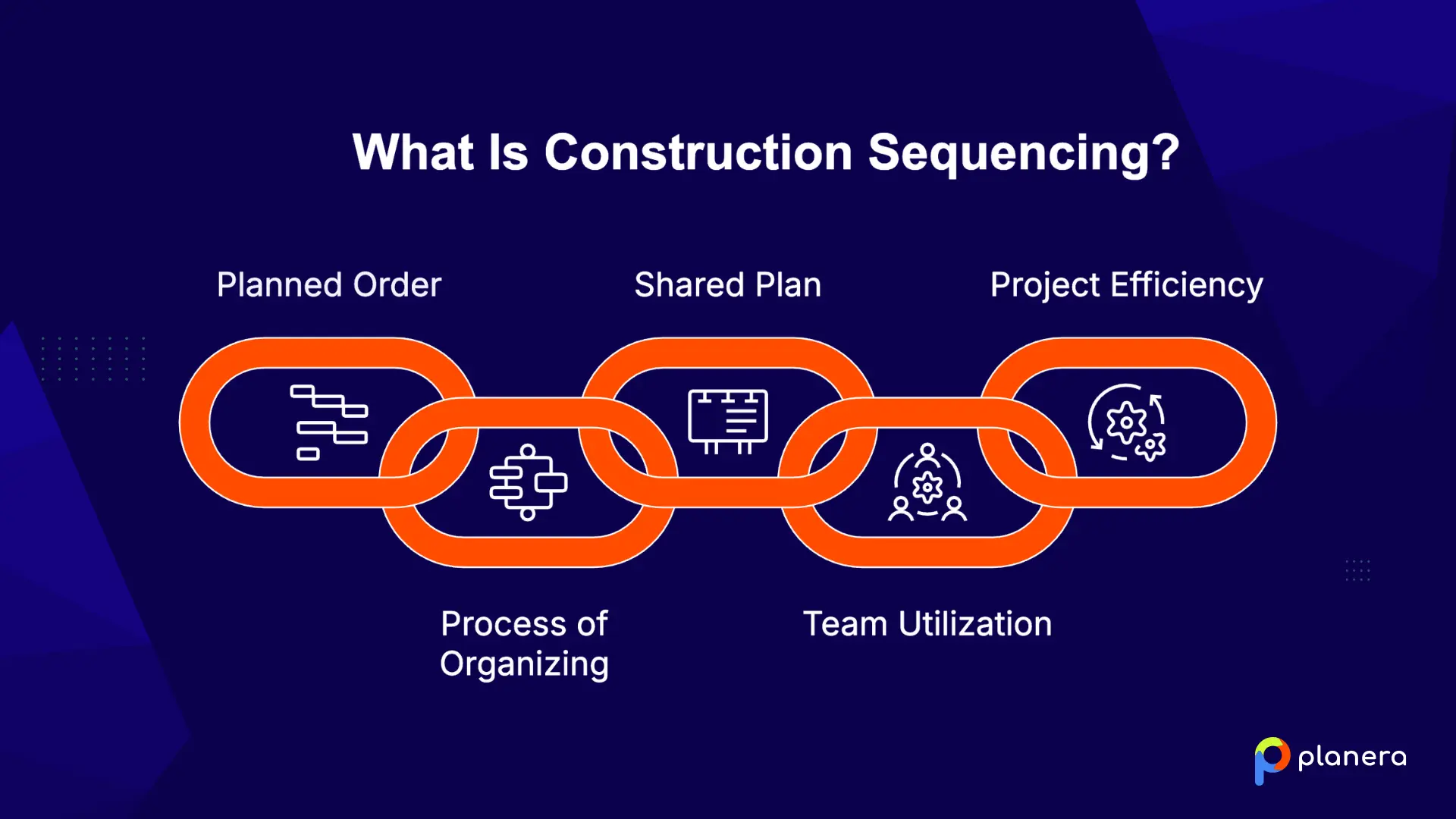
A construction sequence is the planned order of activities needed to complete a project safely and efficiently. It includes everything from site preparation and temporary works to final handover.
Construction sequencing is the process of organizing and adjusting the order throughout the project based on task dependencies, crew availability, material deliveries, and changing site conditions.
A construction sequence plan consolidates all of this information into a single shared plan that teams can follow and update as the project progresses. It "translates sequencing logic into a practical reference that teams can follow, communicate, and revise."
Different teams use the sequence plan in different ways. Schedulers use it to build timelines and milestone dates. Cost planners connect it to budgets, labor needs, and procurement schedules. Field teams use it to coordinate crews, equipment, and subcontractors on site.
When everyone follows the same construction sequence plan, projects run more smoothly, and teams can solve problems before they turn into delays.
What Are the Key Elements of a Construction Sequence Plan?
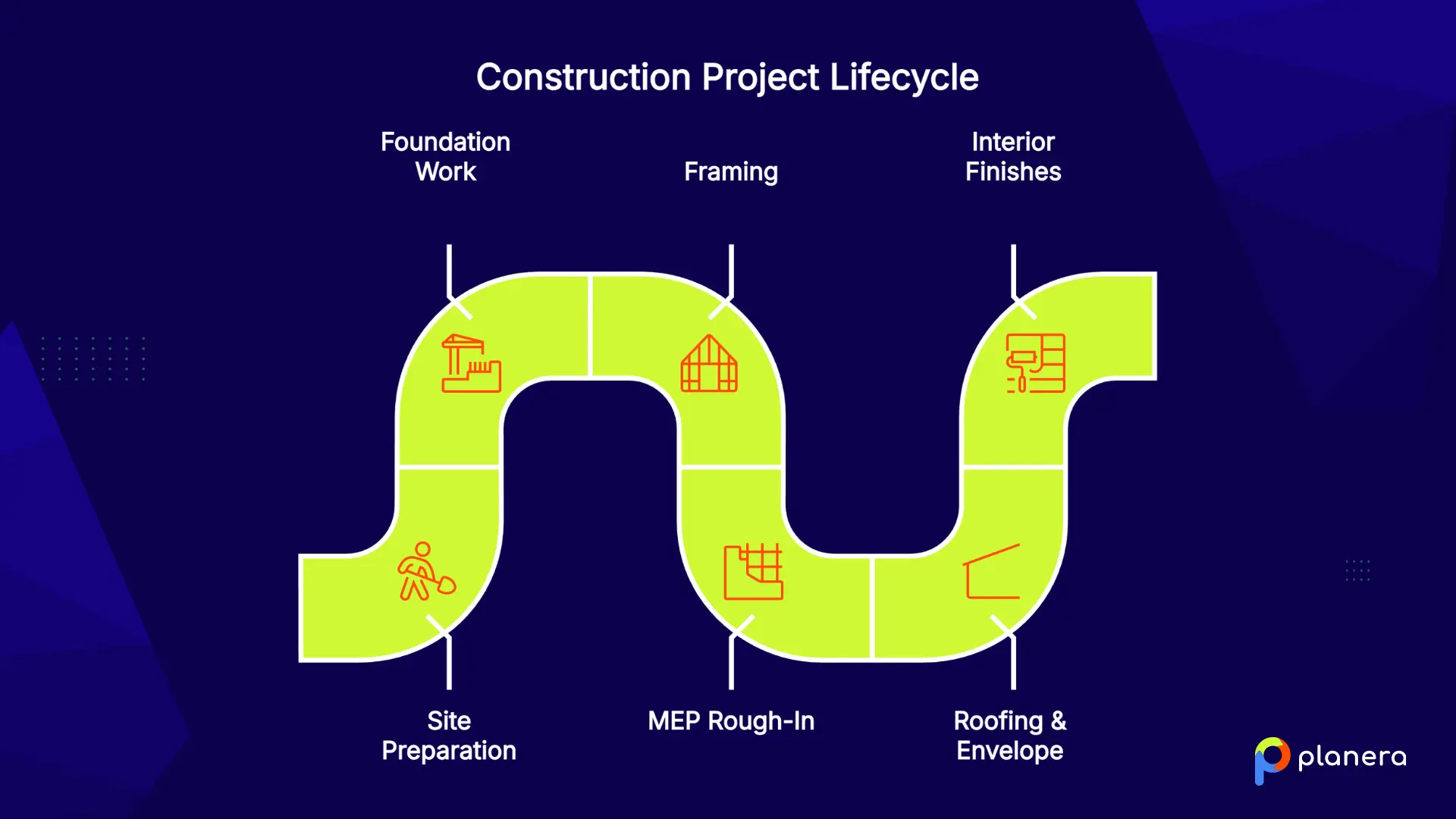
Every construction sequence plan follows a logical order of work. The exact steps may vary depending on the project, but most construction projects follow a similar flow from site preparation to final handover.
- Site Preparation: The first step involves clearing the site, grading, setting up utilities, and preparing access areas. A stable and accessible site is necessary before any major construction work can begin.
- Foundation Work: This phase includes excavation, footings, slabs, or pier installation. The foundation must be fully completed and cured before the structure can be built on top of it.
- Framing: Framing creates the structural skeleton of the building, including walls, floors, and roof framing. Once the frame is in place, other trades can begin their work.
- MEP Rough-In: Mechanical, electrical, and plumbing systems are installed before walls are closed. This stage includes running pipes, ducts, and wiring throughout the structure.
- Roofing and Building Envelope: Roofing and exterior enclosure work help make the building weather-tight. Interior work and finishes usually begin only after the structure is protected from weather conditions.
- Interior Finishes: This phase includes drywall, flooring, painting, fixtures, and final trim work. Finishing activities happen after MEP systems are inspected and approved.
- Handover and Closeout: The final stage includes punch list work, inspections, commissioning, and client walkthroughs. Once everything is approved, the project is handed over to the owner.
How to Create a Construction Sequence Plan
Here are the main steps construction teams use to build a sequence plan that works in the field and keeps projects moving efficiently.
1. Define Project Scope and Constraints
Start by identifying the full project scope, site conditions, and possible constraints before construction begins. This includes permits, safety requirements, site access, operational restrictions, and delivery limitations.
Why it matters: Early planning helps teams reduce surprises, avoid delays, and build a more realistic construction schedule.
2. Break Work Into Activities (WBS)
Use a work breakdown structure (WBS) to divide the project into phases, tasks, and deliverables. Each activity should be detailed enough to be assigned to a specific trade or crew.
Why it matters: Breaking work into smaller activities makes sequencing easier and helps ensure no important tasks are missed.
3. Identify Dependencies Between Tasks
Next, define which tasks depend on others before they can begin. Some activities must finish first, while others can happen at the same time.
Teams should also consider external dependencies such as permit approvals, inspections, and material deliveries. Tools like construction lookahead scheduling help teams stay ahead of these dependencies by surfacing upcoming constraints before they become delays.
Why it matters: Understanding dependencies helps teams build a realistic sequence and identify the project's critical path.
4. Allocate Resources and Timelines
Estimate durations for each activity based on crew size, past project data, and trade input. Make sure labor, materials, and equipment will be available when needed. It is also important to include buffer time for weather delays and high-risk activities.
Why it matters: Proper resource planning prevents crews from arriving before the site is ready and reduces downtime on site.
5. Validate Sequence With Stakeholders
Before execution starts, review the construction sequence plan with architects, subcontractors, engineers, superintendents, and field teams.
This collaborative review helps identify missing steps, unrealistic assumptions, and coordination issues early.
Why it matters: A sequence plan built with input from the full project team is more accurate and easier to execute in the field.
Example of a Construction Sequence Plan
The goal is to organize trades efficiently, reduce site congestion, and keep each phase moving smoothly into the next.
Typical Construction Sequence
- Site preparation and grading
- Foundation excavation and footings
- Slab or crawl space installation
- Structural framing for walls, floors, and the roof
- Roofing and exterior sheathing
- MEP rough-in for plumbing, electrical, and HVAC
- Insulation and drywall
- Interior finishes, flooring, and fixtures
- Exterior finishes and landscaping
- Final inspections and client walkthrough
Each phase depends on the previous one being completed correctly.
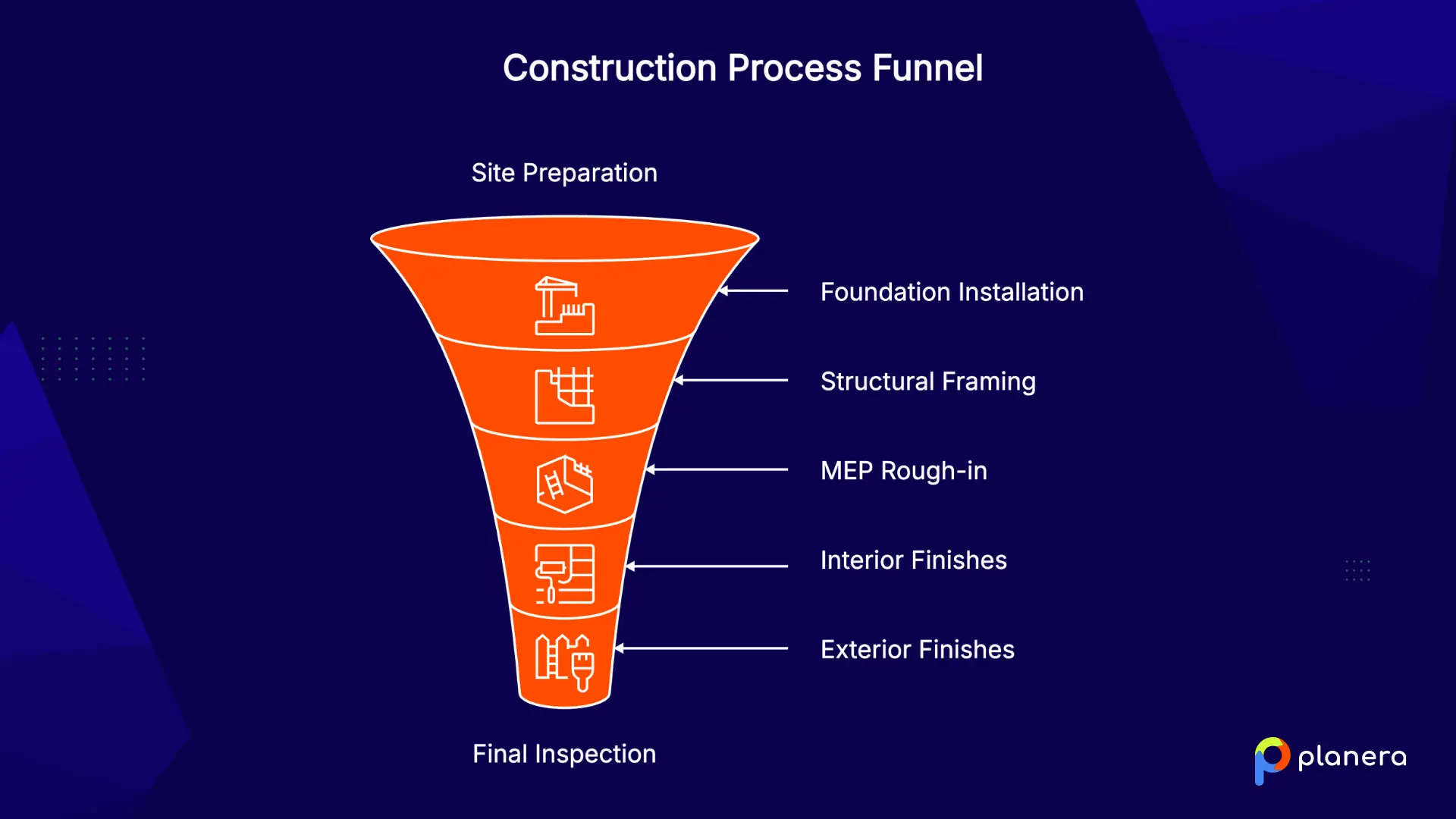
For example, framing cannot begin until the foundation is finished and cured. Walls cannot be closed until plumbing, electrical, and HVAC rough-ins pass inspection. Interior finishes also need to wait until the roof and exterior systems make the building weather-tight.
This step-by-step flow is what construction sequencing is designed to manage.
What Are the Most Common Challenges When Managing a Construction Sequence Plan?
Construction sequence plans often need to adapt to changing site conditions and unexpected issues. Here are some of the most common challenges teams face during construction sequencing.
Unexpected Events
Weather delays, soil problems, permit issues, and supply chain disruptions can quickly affect the project sequence. According to Procore, delays related to weather, materials, or site conditions can put projects significantly behind schedule.
How to manage it: Build buffer time into the schedule when possible and update the sequence plan instead of making rushed decisions in the field.
Resource Constraints
Labor shortages, unavailable equipment, and delayed material deliveries can impact multiple activities at once. If crews or materials are not available when needed, the entire sequence can slow down.
How to manage it: Plan based on realistic labor and resource availability, not ideal conditions. This helps reduce overtime, quality problems, and downtime.
Complex Project Conditions
Projects like hospitals, schools, airports, or dense urban developments often require extra sequencing and phased construction planning to keep parts of the site operational during construction. Big D Construction, for example, used visual planning tools to manage exactly this kind of complexity across large-scale projects.
How to manage it: Break work into smaller phases and carefully coordinate shutdowns, access routes, and trade activities.
Safety Risks
Construction sequencing directly affects jobsite safety. Too many trades working in the same area or tasks happening out of order can create dangerous conditions.
How to manage it: Include safety planning in every sequencing decision and review high-risk activities before work begins.
Common Mistakes to Avoid in Construction Sequencing
Construction sequencing mistakes can lead to delays, rework, and higher costs. According to Outbuild alternatives research and industry analysis, these are some of the most common issues teams face.
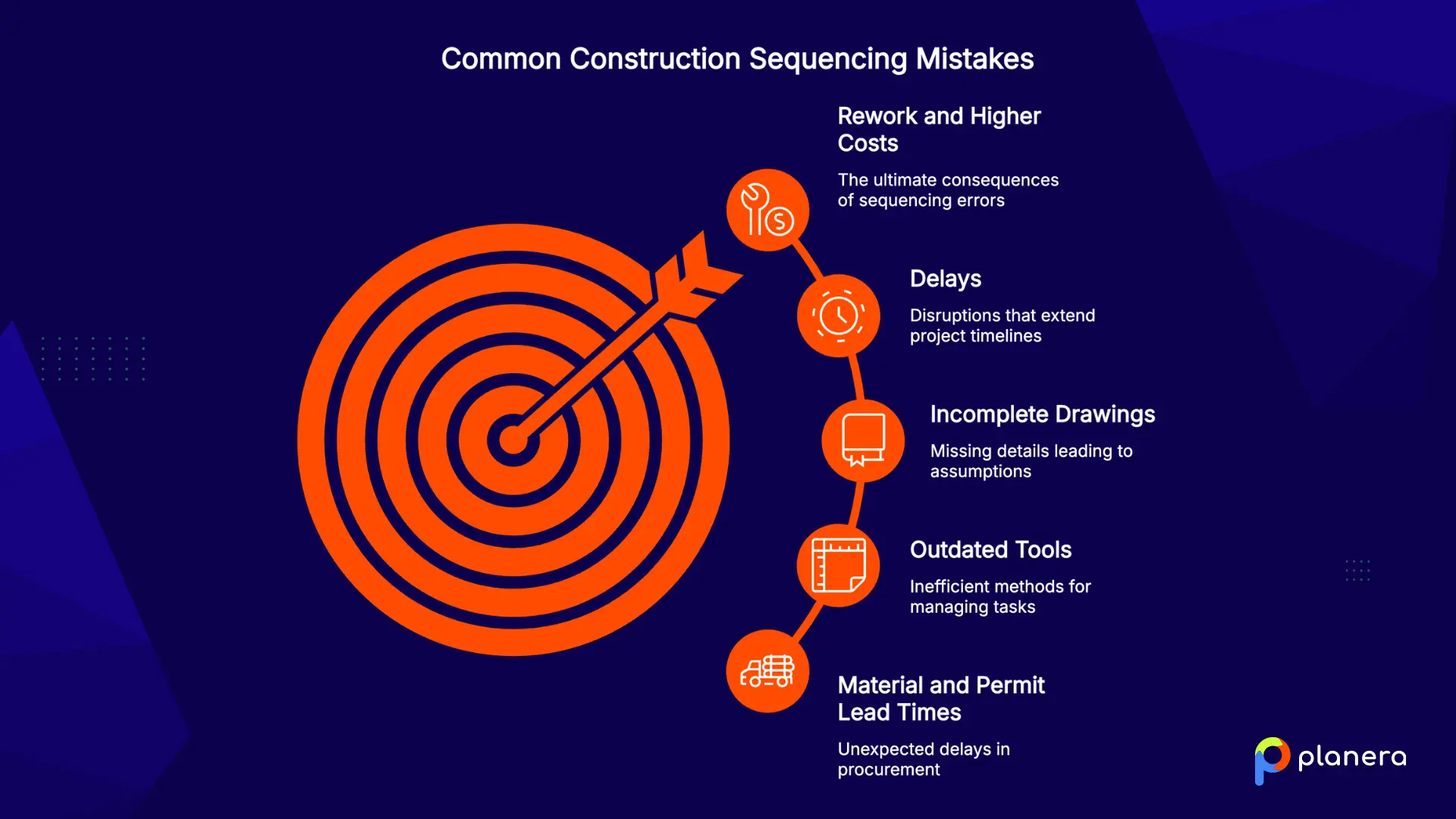
- Not accounting for prerequisites: Crews arrive on site but cannot start because earlier tasks are not finished. This creates delays that spread through the whole project.
Why it matters: Every task depends on earlier work being completed in the right order. - Ignoring material and permit lead times: Permits, inspections, and material deliveries often take longer than expected.
Why it matters: Without proper lead time planning, crews may be forced to wait, causing downtime. - Relying on outdated or informal tools: Sticky notes, spreadsheets, or notebooks cannot manage complex sequencing on large projects.
Why it matters: Information gets lost, and task dependencies become unclear. - Incomplete drawings at the planning stage: Missing details force teams to make assumptions about installation order. According to The AEC Associates, this often leads to wrong sequencing and rework.
Why it matters: Incomplete information increases the risk of doing work out of order. - Undefined phase handovers: When phase boundaries are unclear, downstream trades may start too early.
Why it matters: This can cause failed inspections, rework, and confusion between teams.
What Tools Are Used for Construction Sequencing?
Different tools support construction sequencing in different ways. Some focus on planning, while others help manage execution, coordination, and real-time updates.
1. Project Management Software
Construction project management platforms help teams plan, track, and adjust construction sequences in one place. They connect schedules, tasks, and field updates so everyone works from a shared plan.
Planera is one example of a modern construction sequencing tool that supports visual planning and real-time collaboration between office and field teams. Its digital whiteboard gives project teams a shared canvas to map out sequences together, making it easier to coordinate trades and keep plans updated as site conditions change. Teams looking for a Procore alternative will find that Planera offers a more scheduling-focused approach built around sequencing and field collaboration.
2. Gantt Charts
Gantt charts display construction activities along a timeline and show task dependencies and the critical path. They are commonly used in construction scheduling to provide a clear visual overview of project progress.
3. Pull Planning (Last Planner System®)
Pull planning is a lean construction method where teams work backward from a milestone to define the sequence of work. It is collaborative and relies on input from field teams to build realistic schedules.
4. BIM (4D/5D modeling)
4D BIM links a 3D model to the project schedule to simulate construction over time. 5D BIM adds cost data, allowing teams to connect sequencing with budget planning and forecasting.
5. Prefabricated Construction
Prefabrication involves manufacturing components off-site, such as wall panels or MEP modules, and delivering them for installation. This shifts sequencing to include manufacturing timelines and delivery coordination alongside onsite work.
Construction Sequencing vs. Scheduling: What's the Difference?
These two terms are often used interchangeably, but they are not the same. Construction sequencing defines the logical order of work across the project, from site setup to handover, while construction scheduling turns that sequence into a dated plan with durations, dependencies, resources, and deadlines.
| Aspect | Construction Sequencing | Construction Scheduling |
|---|---|---|
| Focus | Order of activities and logical dependencies | Timing of when activities start and end |
| Output | Sequence roadmap | Dated schedule, such as a Gantt chart or CPM network |
| Nature | Qualitative logic | Quantitative dates and durations |
| Key question | "What comes before what?" | "When does each task start and finish?" |

Construction sequencing defines the order of work, while construction scheduling adds dates and durations to that order.
Sequencing comes first and acts as the foundation. Scheduling builds on top of it by placing that logic onto a timeline. A project cannot have a reliable schedule without a clear and realistic sequence underneath it.
How Does Planera Improve Construction Sequencing?
Planera is a visual construction scheduling platform that helps teams build and manage sequences together in real time. Its canvas-style interface makes it easier for project managers, superintendents, and field teams to collaborate on the same plan.
For construction sequencing, Planera supports Gantt charts with dependency tracking, pull planning workflows, critical path analysis, and scenario testing, which helps teams assess construction fast tracking before overlapping work. Its AI scheduling assistant helps teams identify sequencing risks early and suggest adjustments before they impact the schedule.
Because both office and field teams work in the same system, updates happen in real time, and everyone stays aligned on one version of the construction sequence.
Planera also integrates with tools like Autodesk Construction Cloud and Procore, so sequencing stays connected across existing project systems.
FAQ
Why is construction sequencing important?
Construction sequencing helps keep projects on track. It reduces delays, avoids rework, and controls costs by making sure each trade starts only when the previous work is ready. It also helps coordinate workers, equipment, and materials so nothing sits idle. Poor sequencing is a common reason projects fall behind schedule.
How do you create a construction sequence plan?
Start by defining the project scope and understanding site limits. Break the work into smaller tasks using a Work Breakdown Structure. Then set the order of tasks by identifying what depends on what. Add time estimates and resources for each task. Finally, review the plan with subcontractors and field teams before work begins.
What is the first step in construction sequencing?
The first step is planning before construction starts. This includes understanding the project scope, constraints, and task order. Once work begins on site, the first step is usually site preparation, such as clearing land, grading, and setting up utilities.
What tools are used for sequencing construction projects?
Teams use different tools to plan and manage sequencing. These include construction scheduling software, Gantt charts, pull planning sessions, and 4D BIM models. Each tool helps teams plan tasks, understand timing, and coordinate work on site.

You deserve better scheduling software.
Drive revenue, reduce costs, and manage scheduling with Planera.
Request a Demo