



A construction master schedule can look perfectly fine while field conditions tell a different story. Crews fall behind, materials arrive late, and work gets resequenced without the main schedule reflecting those changes. Only 24% of general contractors say their schedules accurately reflect field conditions.
A reliable weekly work plan helps close that gap. This guide covers nine steps to build one, what to include, common reasons weekly plans fail, and what to do when work falls behind.
What Is a Weekly Work Plan in Construction and What Should It Include?
A weekly work plan turns the broader construction schedule into specific commitments for the week ahead. Foremen and trade leads build it from work that is ready to start and agree on what each crew will complete.
Think of it as the commitment layer of your planning:
- Master schedule: What should happen across the project.
- Lookahead plan: What can happen in the near term based on upcoming work and constraints.
- Weekly work plan: What each crew commits to complete that week.
Each task should pass a simple 3W test: what work, when, and who owns it. If one of these is missing, the task needs more detail before it goes on the weekly plan.
The plan can also include constraints, location, materials, predecessor work, and any other information the crew needs to complete the task.
How Do You Create a Weekly Work Plan for Construction?
You don't build a weekly plan from a blank sheet. Start with the lookahead, keep the work that is ready to go, and turn it into clear commitments for the week ahead.
1. Review the Current Construction Schedule
Start with the construction master schedule and the latest progress update. Check what is due in the next one to two weeks and which activities are on or near the critical path. Review last week's plan as well, since unfinished work may need to carry over.
2. Select Activities Planned for the Week
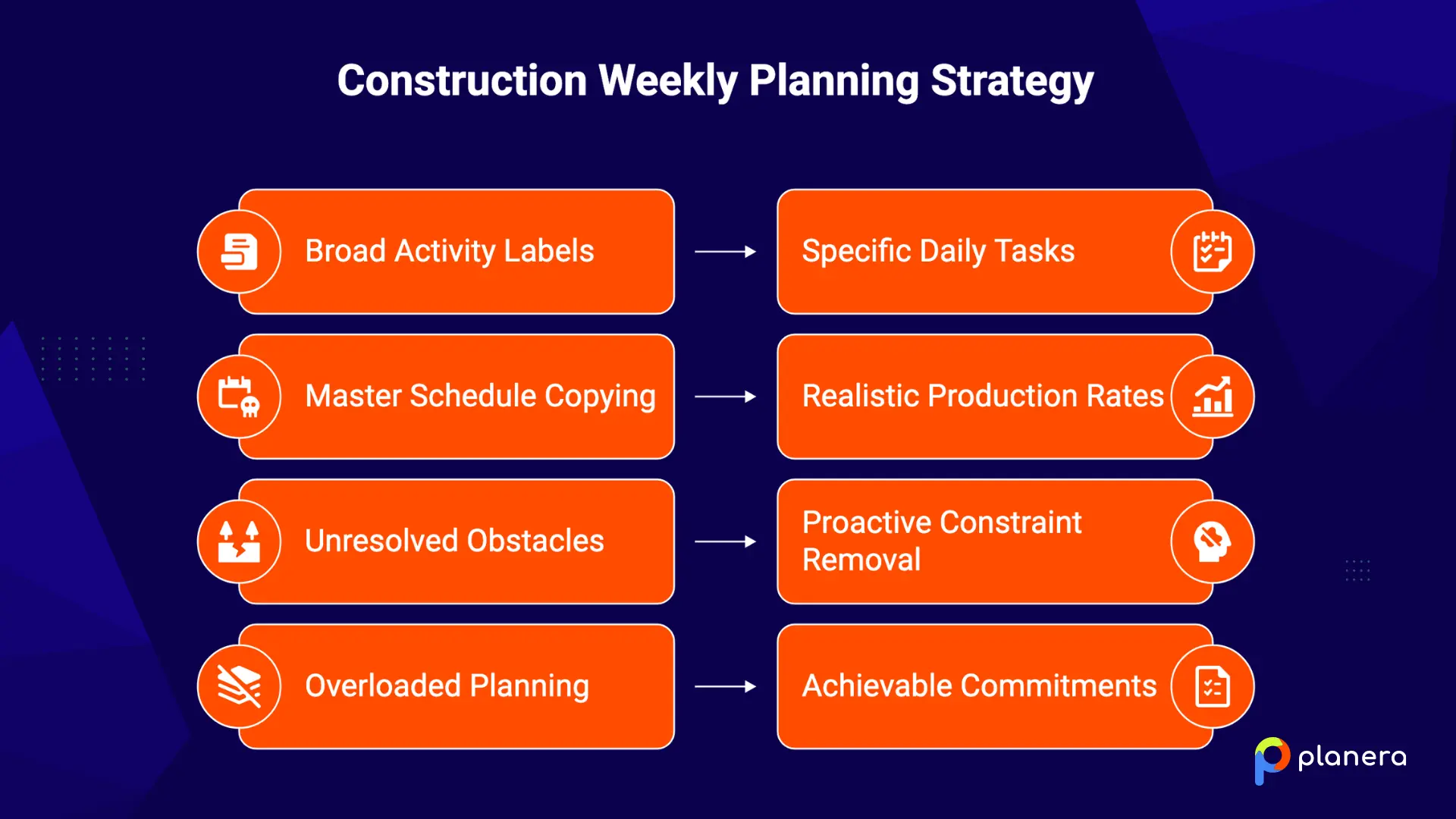
Choose lookahead activities that are ready to start. Then break larger activities into specific daily tasks. For example, “hang drywall, level 3 east, Tuesday” gives a crew a clear commitment, while “drywall” does not.
3. Confirm Predecessors and Dependencies
Check that the work leading into each task will be complete before the planned start. Confirm handoffs between trades as well. If electrical rough-in needs two more days, the inspector and drywall crew need to know before the weekly plan is finalized.
4. Check Labor, Materials, and Equipment Availability
Confirm that each task has the crew, materials, and equipment needed to start and finish on time. This is especially important when skilled labor is limited. The NCCER/AGC 2025 Workforce Survey found that 92% of hiring firms struggle to find qualified workers, while 45% say worker shortages have caused project delays.
A resource-loaded schedule can help you see where crews are already committed to other work and identify resource conflicts before the weekly plan is finalized.
5. Identify and Remove Constraints
List anything that could prevent each task from starting, such as drawings, RFI responses, approvals, site access, or materials. Assign an owner and due date to each constraint. If it cannot be resolved before the planned start, move the task out of the weekly plan rather than treating it as a commitment.
6. Assign Work to Crews and Subcontractors
Have trade leads participate in building the plan and agree on the work their crews can complete. Assign one clear owner to each task and confirm the handoffs between trades. This is also where pull planning in construction can help teams agree on the sequence before work begins.
7. Set Weekly Production Targets
Commit to work that crews can realistically complete. Base targets on recent production rates, available resources, and site conditions rather than simply copying what the master schedule says should happen. A smaller plan that gets completed is more useful than an overloaded plan full of missed commitments.
8. Confirm the Plan With the Project Team
Hold a short weekly meeting with the active trades and review the plan task by task. Each foreman should confirm that the work is achievable with the available labor, materials, equipment, and access. Resolve any concerns before the plan is finalized.
9. Track Progress During the Week
Use daily check-ins to track each commitment. Mark tasks complete as they finish and record the reason when something does not. Feeding construction project progress updates back into the schedule helps the team spot problems while there is still time to respond.
What Should a Construction Weekly Work Plan Include?
A weekly work plan should give crews enough information to understand what needs to happen, who is responsible, and what is needed to complete the work. At a minimum, include:
- Planned activities: Specific tasks with the location, planned day, and scope. Break larger activities into work that one crew can realistically complete.
- Crew and labor requirements: The trade, expected crew size, and person responsible for the task.
- Materials and equipment: Required materials, deliveries, lifts, cranes, and other equipment, along with their planned availability.
- Dependencies and prerequisites: Upstream work, inspections, approvals, and handoffs that must be completed before the task can start.
- Safety requirements: Required permits, PPE, hazard controls, and area restrictions such as hot work or overhead lifting.
- Quality requirements: Inspection points, hold points, and acceptance criteria that need to be met before the work is considered complete.
- Target completion: The planned completion day and a simple status showing whether the commitment was completed.
How Does a Weekly Work Plan Connect to the Construction Schedule?
Think of construction planning as three connected layers. The master schedule sets the project milestones and critical path. A 2- to 6-week construction lookahead schedule brings upcoming work into focus and helps clear constraints. The weekly work plan turns that near-term work into specific commitments for each crew.
The connection also works in reverse. Progress and missed commitments from the weekly plan feed back into the lookahead and master schedule. That keeps planned dates aligned with what is actually happening in the field. Without this feedback, the master schedule can gradually drift from reality, making it harder for the team and owner to trust the dates.
What Can Prevent a Construction Weekly Work Plan From Being Completed?
Weekly plans usually miss because the work was not ready to start, not because crews simply worked too slowly. The most common issues are:
- Work is not ready to start: Check for constraints during lookahead planning instead of waiting until the day work is scheduled.
- Materials or equipment are unavailable: Confirm deliveries, rentals, and equipment bookings before the weekly plan is finalized.
- Crews or subcontractors are unavailable: Confirm crew availability and flag subcontractors who are committed to multiple jobs.
- Predecessor activities are incomplete: Check the work area and confirm that upstream activities will be completed before the next crew starts.
- Site access or work areas are unavailable: Coordinate work areas by day to prevent trades from competing for the same space.
- Production targets are unrealistic: Base weekly commitments on recent production rates, available resources, and actual site conditions.
- New issues change the planned work: Track design changes, RFIs, and other issues as they arise, then replace affected tasks with work that is ready to start.
How Do You Track and Update a Weekly Work Plan for Construction Projects?
A simple way to measure weekly plan reliability is Percent Plan Complete (PPC). Calculate it as:
PPC = completed tasks ÷ promised tasks × 100
If the team commits to 10 tasks and completes 8, the PPC is 80%. Each task is counted as complete or incomplete, with no partial credit.
For every missed task, record the reason for the variance. Over time, these reasons show where planning is breaking down, whether that is missing materials, incomplete predecessor work, labor shortages, or other constraints.
Review the results at the end of each week, update the remaining work, and carry unfinished tasks into the next plan only when they are ready. The goal is not to achieve a perfect PPC every week. It is to make realistic commitments and use the misses to improve the next week's plan.
What to Do When the Weekly Work Plan Falls Behind
When a weekly plan falls behind, address the cause before simply adding more work to the next week. SmartPM's 2026 report found that projects without a recovery plan performed roughly 2.5 times worse than projects that responded early.
Start with the variance reasons and identify the actual blocker. Then re-sequence the affected work, clear the constraint, or adjust resources where they can make a difference without creating new conflicts. A quick construction delay analysis can also show whether the missed work affects the critical path or project completion date.
Finally, reset the next week's commitments based on the work that is actually ready and the team's available capacity. This keeps one bad week from turning into a string of unrealistic plans.
How Planera Supports Weekly Work Planning in Construction
In Planera, we connect weekly field planning with the broader project schedule. Our Lookahead lets you filter the master schedule into a rolling window, such as “Today + 3 weeks,” so teams can focus on the work coming up without losing sight of the overall plan.
From there, Field Schedule turns a 3- to 6-week lookahead into a task-level field plan in about 30 seconds. Trade partners can join as Contributors and add daily tasks, durations, and owners without getting access to the master schedule.
As the week progresses, field teams can update their work and send that progress back to the master schedule for scheduler review. Planera also connects with Procore and Autodesk Construction Cloud and supports P6 and Microsoft Project imports and exports.
The result is a tighter connection between what the project schedule says should happen and what crews are actually doing in the field.
Book a demo to see how Planera handles field planning
FAQ
What is a weekly work plan in construction?
It is a short-term plan that lists the tasks each crew commits to complete during the coming week, along with the planned day and person responsible.
How do you create a weekly work plan for construction?
Pull ready tasks from the lookahead, confirm predecessors and resources, clear constraints, and get commitments from the foremen and trade leads responsible for the work.
What should be included in a construction weekly work plan?
Include specific tasks, owners, crew requirements, materials, equipment, prerequisites, safety and quality requirements, and a target completion day.
What is the difference between a weekly work plan and a construction schedule?
The master schedule covers the project as a whole and sets major dates and milestones. A weekly work plan breaks upcoming work into specific commitments for each crew.
How far ahead should a construction weekly work plan be prepared?
Start preparing the plan one to two weeks ahead, using a 2 to 6 week lookahead to identify and clear constraints before work reaches the weekly plan.
How does weekly work planning improve construction scheduling?
It identifies constraints before work starts and feeds actual field progress back into the project schedule, helping planned dates stay aligned with site conditions.
Who should create the weekly work plan on a construction project?
The superintendent or project team typically leads the process, while foremen and trade leads help build the plan and commit to the work their crews will complete.
How do you track progress against a weekly work plan?
Check progress during daily huddles and mark tasks as complete or incomplete. At the end of the week, calculate PPC and record the reason for each missed commitment.
What causes a weekly construction work plan to fail?
Common causes include missing materials or labor, incomplete predecessor work, design issues, unavailable work areas, and unrealistic production targets.
How does lookahead planning support weekly work plans?
A lookahead schedule gives the team time to identify and remove constraints, so the weekly plan focuses on work that is ready to start.

You deserve better scheduling software.
Drive revenue, reduce costs, and manage scheduling with Planera.
Request a Demo


.webp)