



Construction projects generate a huge amount of information, from schedules and progress updates to RFIs, cost data, and site reports. AI agents can help teams make sense of this information, identify potential problems, and support decisions before small issues become larger ones.
Interest in this technology is growing. The agentic AI in construction project management market reached $1.0 billion in 2025 and is expected to reach $12.8 billion by 2034.
In this guide, we’ll tell you how construction AI agents work, where teams use them, their benefits and challenges, and how to get started.
What Are AI Agents for Construction and How Do They Work?
AI agents for construction are software systems that use AI to monitor, analyze, and act on project data with limited human input. They can combine large language models, machine learning, and computer vision to work with schedules, documents, site information, and other project data.
Unlike traditional software, an AI agent can analyze information and take the next step instead of simply displaying it. For example, it can identify a schedule delay, trace the cause, explain the potential impact, and suggest what to do next. Some agents can also run scenarios or carry out approved actions.
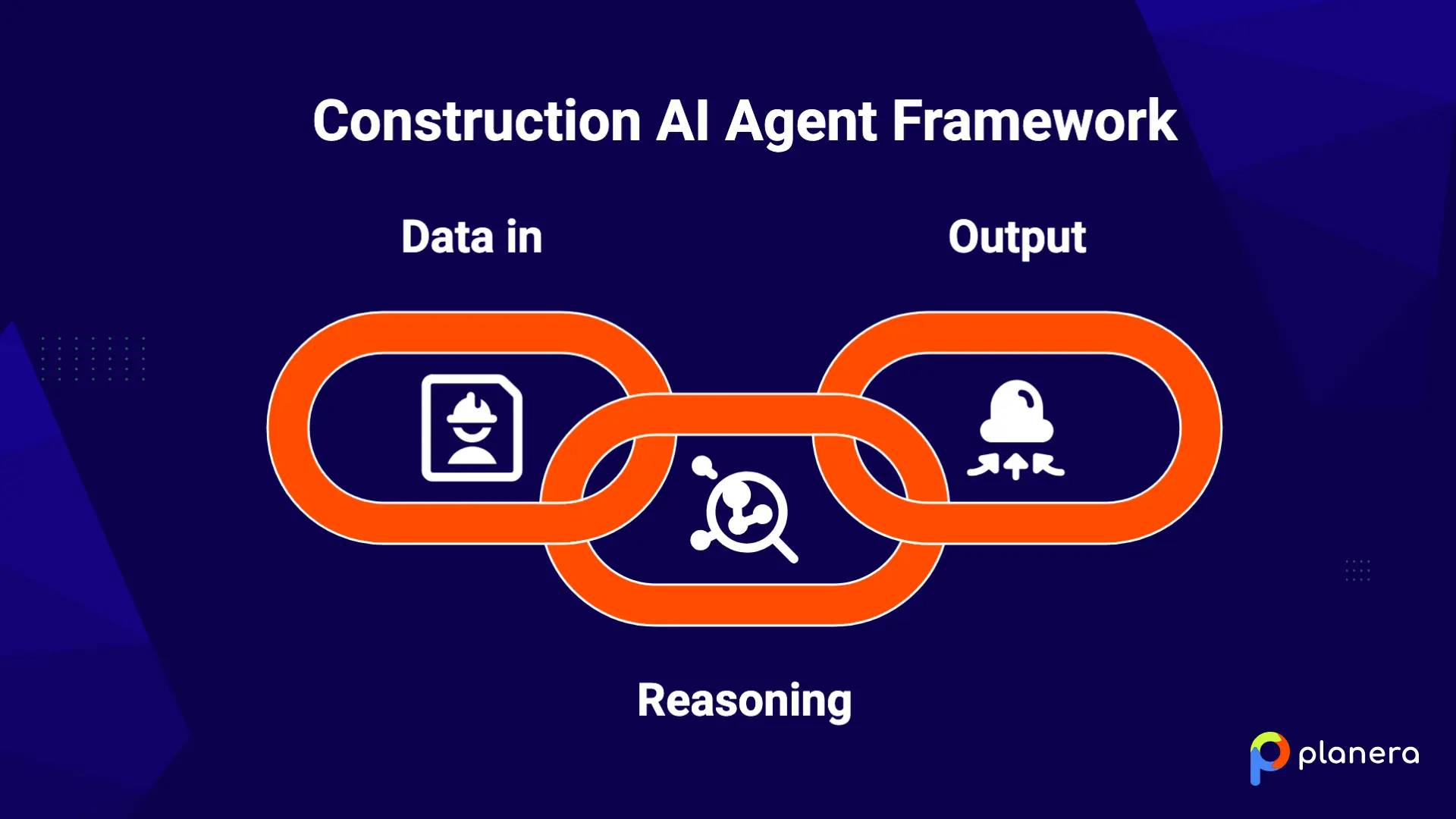
Most construction AI agents work across three layers:
- Data in: Collects schedules, field reports, photos, cost data, and documents.
- Reasoning: Analyses the data to identify patterns, variances, risks, and changes.
- Output: Sends alerts, recommends actions, runs scenarios, or carries out approved changes.
The project team still reviews the results and makes the final decision.
What Are the Most Common Use Cases for AI Agents in Construction?
AI agents can support many parts of a construction project, from scheduling and risk management to cost tracking, documentation, procurement, and safety. The most common use cases include:
AI Agents for Construction Scheduling and Schedule Updates
Scheduling agents analyse CPM logic, dependencies, float, and progress updates to identify how changes could affect the project. Teams can ask questions such as what happens if a key activity is delayed and use the agent to model different scenarios, including construction fast tracking options to recover lost time.
For example, if a steel delivery is delayed by two weeks, an AI agent can trace the affected activities, identify changes to the critical path, and show how the delay could affect the planned completion date.
AI Agents for Delay Detection and Risk Management
AI agents can monitor project data for signs of potential delays, including changes in progress, labour availability, weather, or material deliveries. They can flag risks early and help teams assess how those risks could affect the schedule.
For example, an agent could detect that several activities are progressing more slowly than planned and warn the project team that a key milestone schedule date is at risk. It could then suggest resequencing unaffected work to reduce the impact.
AI Agents for Project Progress Tracking
Progress-tracking agents use computer vision, site photos, drone footage, or other site data to compare actual work with the construction master schedule and project plan. They can identify completed work, highlight gaps, and give teams a clearer view of progress without relying entirely on manual site reporting.
For example, an agent can compare recent site images with the BIM model and schedule to show which walls, mechanical systems, or other elements have been installed and which are still outstanding.
AI Agents for Cost Tracking and Budget Monitoring
Cost agents can monitor purchase orders, change orders, labour hours, and material costs against the project budget. They can flag unusual changes and help forecast the expected final cost using current project data, remaining work, and known risks.
For example, an agent could detect that material costs are rising faster than planned and update the forecast to show how the change could affect the project's final cost.
AI Agents for Construction Document Management and Communication
Document agents can review contracts, RFIs, submittals, reports, and other project documents. They can summarize information, identify important details, and route documents or questions to the appropriate team member.
For example, an agent could review an RFI, identify the relevant contract requirements, summarize the issue, and route it to the person responsible for responding.
AI Agents for Procurement and Material Tracking
Procurement agents track orders, lead times, deliveries, and material requirements. They can flag late or missing deliveries before they affect installation work and help teams understand which materials could put upcoming activities at risk.
For example, if electrical equipment is expected to arrive after the planned installation date, the agent can flag the conflict and show which scheduled activities could be affected.
AI Agents for Quality Control and Safety Management
AI agents can also support quality and safety by analyzing camera footage, sensor data, inspection records, and other site information. They can identify issues such as missing PPE, unsafe conditions, or potential defects and alert the team.
For example, a safety agent could identify workers entering a restricted area without the required PPE, while a quality agent could flag an installation that does not match the project requirements.
Earlier detection can help teams address these issues before they lead to incidents, rework, or delays.
What Are the Benefits of AI Agents for Construction?
AI agents can reduce repetitive project work, analyze large amounts of project data, and help teams identify issues earlier. A 2026 commercial construction report comparing AI adopters with the industry average found differences across several project metrics:
| Metric | Industry Average | AI Adopters |
|---|---|---|
| Average project delay | 17 months | 11 months |
| Average cost overrun | 26% | 14% |
| Rework as % of project cost | 7.9% | 3.1% |
| Contractor net margin | 3.5% | 5.8% |
| Safety incidents per 100 workers | 2.8 | 1.7 |

These figures show an association between AI adoption and better project outcomes, but they do not by themselves prove that AI caused the differences.
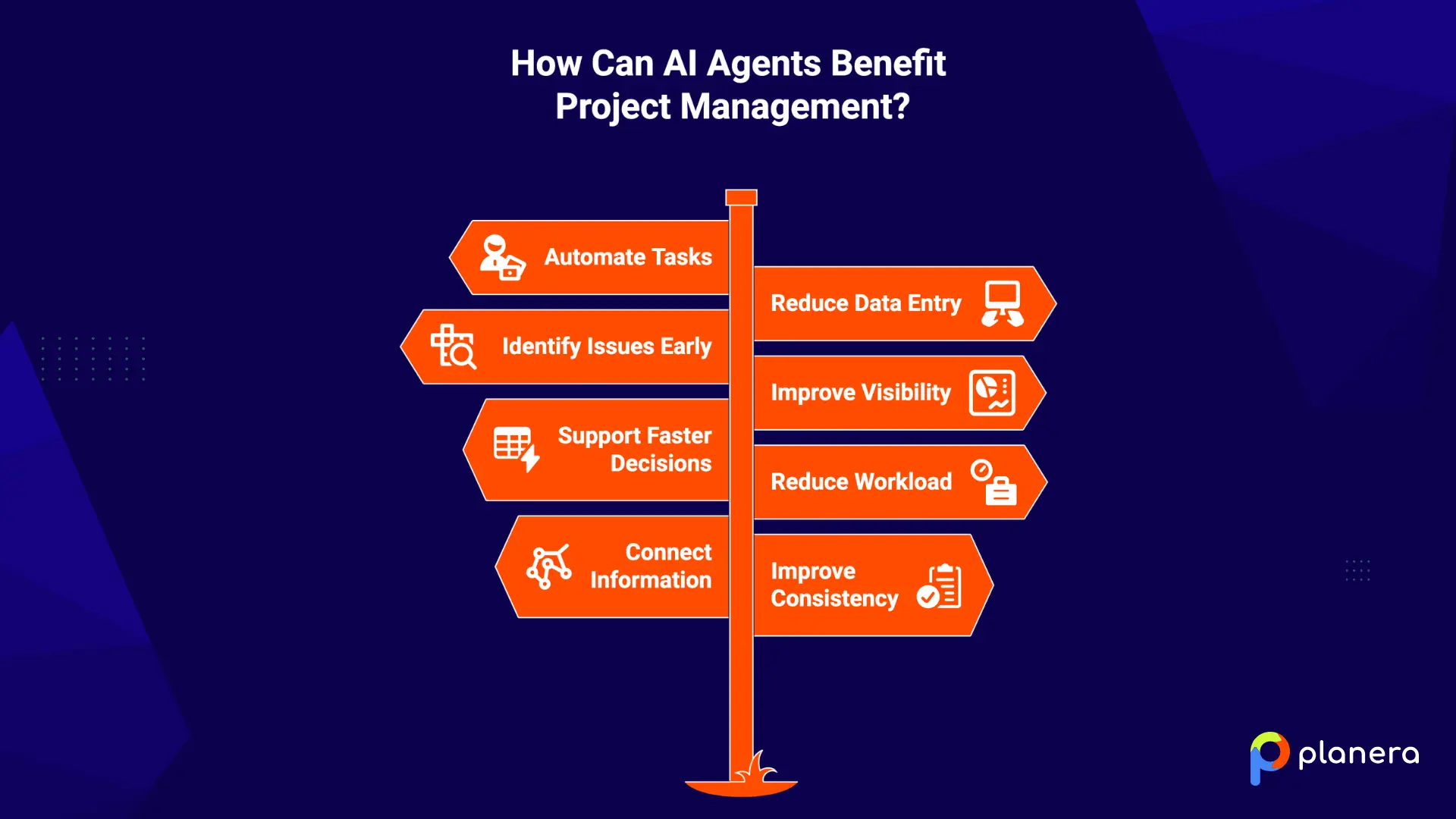
The practical benefits of AI agents include:
- Automate repetitive project tasks: Agents can handle routine status checks, schedule updates, reminders, and reports that would otherwise require manual work.
- Reduce manual data entry: Agents can pull information from field reports, documents, and other systems, reducing the need to enter the same data repeatedly.
- Identify issues earlier: Agents can monitor schedules, costs, progress, and other project data and flag potential problems before they become larger issues.
- Improve schedule and resource visibility: Teams can quickly see changes to activities, float, dependencies, and resource requirements instead of reviewing this information manually.
- Support faster decisions: AI agents can analyze changes and run what-if scenarios quickly, giving teams more information when deciding how to respond.
- Reduce administrative workload: By handling routine analysis and project tasks, agents can give project managers and other team members more time for planning, coordination, and decision-making.
- Connect information across workflows: Agents can bring together schedule, cost, field, and document data so teams can see how a change in one area could affect another. This supports collaborative approaches like pull planning in construction, where teams across trades need shared visibility into the plan.
- Improve consistency: Automated checks and processes can be applied in the same way across projects, reducing the variation that can come with fully manual processes.
What Are Examples of AI Agents for Construction?
AI agents are already being used for specific construction tasks, from schedule analysis and progress tracking to document review and reporting. Examples include:
- AI scheduling agents: These agents analyze CPM logic, dependencies, and schedule changes and can answer schedule questions in plain language. Manny by Planera, for example, works with a live project schedule to analyze delays and what-if scenarios.
- AI progress tracking agents: These agents analyze drone footage, site photos, and other field data to compare completed work with the project plan. DroneDeploy's Progress AI and Inspection AI are examples of this approach.
- AI cost and estimating agents: These agents can analyze project costs, track spending against budgets, and help forecast final costs. In estimating workflows, they can also review project information and support the preparation of bids.
- AI document management agents: These agents review contracts, RFIs, submittals, and other documents to find key information, deadlines, risks, and action items.
- AI resource planning agents: These agents analyze upcoming work and resource requirements to identify potential labour or equipment conflicts before they affect the schedule.
- AI reporting agents: These agents collect project information and turn it into daily, weekly, or other recurring reports, reducing the amount of manual reporting work.
Planera brings these capabilities into a broader construction scheduling workflow. We combine AI assistance with visual CPM scheduling, collaboration, and project planning in one platform. This lets teams use AI alongside the scheduling tools they already rely on.
What Data Do AI Agents Need to Work Effectively?
AI agents rely on project data to analyze conditions, identify risks, and provide useful recommendations. The quality and consistency of that data directly affect the quality of the results. Key data sources include:
- Project schedules: Clean CPM schedules with accurate activities, dependencies, durations, and logic ties.
- Field progress data: Daily reports, site photos, progress updates, and percent-complete information.
- Cost and budget data: Estimates, purchase orders, change orders, committed costs, and actual spending.
- BIM and design information: Models, drawings, and other design data that provide context about project scope and sequencing.
- Contracts and project documents: Specifications, RFIs, submittals, contracts, and other documents that contain project requirements.
- Labour and resource data: Crew sizes, productivity rates, equipment availability, and resource assignments.
- Historical project data: Records from completed projects that can help agents identify patterns, estimate durations, and compare current work with similar projects.
What Are the Challenges of Using AI Agents in Construction?
AI agents can help construction teams analyze information and automate routine work, but they also introduce practical challenges. The main ones include:
- Poor-quality or incomplete project data: AI agents depend on accurate, consistent data. Missing schedule logic, outdated documents, or incomplete site updates can lead to unreliable results.
- Integration with existing construction software: Agents often need access to schedules, cost systems, project management platforms, and other tools. Poor integration can create another data silo instead of connecting existing workflows.
- Human oversight: AI can analyze project information and recommend actions, but project managers and schedulers still need to review important decisions, particularly when they affect cost, safety, or the schedule.
- Data security: Construction projects contain sensitive information, including contracts, bids, financial data, and client information. Teams need to understand how an AI tool stores, processes, and protects this data.
- User adoption: An agent is only useful if project teams actually use it. Construction companies may need to introduce new workflows gradually and show teams how the technology fits into their existing work.
- Clear limits on AI actions: Teams need to decide which tasks an agent can handle automatically and which require human approval. This is particularly important when an action could change a live schedule, cost, or other project information.
How Can Construction Companies Implement AI Agents?
Construction companies can introduce AI agents gradually rather than changing multiple workflows at once. A practical approach is to:
- Choose one high-value workflow: Start with a task where AI could solve a clear problem, such as schedule analysis, progress tracking, document review, or safety monitoring.
- Prepare the data: Review schedules, documents, cost information, and other data the agent will use. Fix missing information, outdated records, and inconsistent formats before implementation.
- Test the agent on a live project: A real project gives the team a better way to evaluate the agent's results and identify problems that may not appear in a test environment.
- Set approval boundaries: Define which tasks the agent can handle independently and which actions require review or approval from a project manager or other team member.
- Connect it to existing systems: Where possible, integrate the agent with scheduling, project management, cost, and other systems already used by the team. This helps avoid creating another isolated source of project data.
- Measure the results: Track practical measures such as time saved, issues identified, reporting effort, or changes in schedule performance. Use the results to decide whether to expand the use of the agent to other projects or workflows.
How Planera Uses an AI Scheduling Assistant to Support Collaborative Construction Scheduling
Planera launched AI scheduling assistant Manny, in April 2026 to help project teams work with complex schedule information more easily. Instead of manually searching through large schedules, teams can use natural language to ask questions and explore project information.
This makes AI useful during the day-to-day work of managing a project. A project manager can investigate a potential issue, ask about a change, or explore a scheduling question without having to work through the analysis manually first. The scheduler still reviews the information and decides what action to take.
Manny is built to support scheduling expertise rather than replace it. It handles parts of the analysis so project teams can spend more time reviewing options and making decisions based on the needs of the job.
AI agents will not replace the people running construction projects. Their value comes from helping teams work through project information faster and focus more time on decisions that require experience and judgement. Book a Planera demo to see how Manny fits into a real construction scheduling workflow.
FAQ
What are AI agents for construction?
AI agents are software systems that use AI to monitor, analyze, and act on project data. They can identify issues, answer questions, run scenarios, and recommend next steps.
How are AI agents used in construction?
Common uses include scheduling, delay and risk analysis, progress tracking, cost monitoring, document review, procurement, resource planning, and safety management.
What is an example of an AI agent in construction?
Manny by Planera is one example. It helps teams work with construction schedule information using natural-language questions. Other examples include AI tools for progress tracking, safety monitoring, document review, and procurement.
Can AI agents create construction schedules?
Some AI agents can help create or update schedules by analyzing activities, dependencies, durations, and other project information. Experienced schedulers still need to review the results and adjust the plan based on project requirements.
Can AI agents predict construction delays?
Some AI agents can analyze schedule, resource, cost, and field data to identify factors that may increase the risk of delays. The reliability of these predictions depends on the quality and completeness of the underlying data.
What is the difference between an AI agent and construction AI software?
Traditional construction software generally waits for a user to request an analysis or update. An AI agent can monitor information, reason across different data sources, and recommend or carry out approved actions with less manual input.
What data do construction AI agents need?
Depending on the use case, they may need project schedules, field progress data, cost information, BIM models, contracts, labour and resource data, and historical project records.
Can AI agents replace construction project managers?
No. AI agents can support analysis and routine tasks, but project managers still need to review important information, manage people and relationships, and make final project decisions.
Are AI agents suitable for small construction companies?
They can be, particularly when a company starts with a specific workflow where AI can solve a clear problem. The right approach depends on the company's project data, existing software, budget, and technical requirements.
How much do AI agents for construction cost?
Pricing varies by provider, features, users, and implementation requirements. Some AI capabilities are included in construction software, while others are offered as separate products or add-ons. Companies should compare pricing with the expected value of the specific workflow they want to improve.

You deserve better scheduling software.
Drive revenue, reduce costs, and manage scheduling with Planera.
Request a Demo